Project Recovery

What is it?

If Mantid crashes for some reason, we have introduced the functionality to attempt to recover the state that Mantid was in prior to the crash.

Project recovery is a key part of our efforts to make Mantid as stable and reliable as possible.

How it works

Project recovery works in two parts:

  • History writer: This writes the history of the workspaces in your workspace dialog, periodically saving the files. It is not likely that you will ever notice the history writer process.
  • Project recovery: This rebuilds the last saved state of Mantid after a crash, it uses the files produced by the history writer

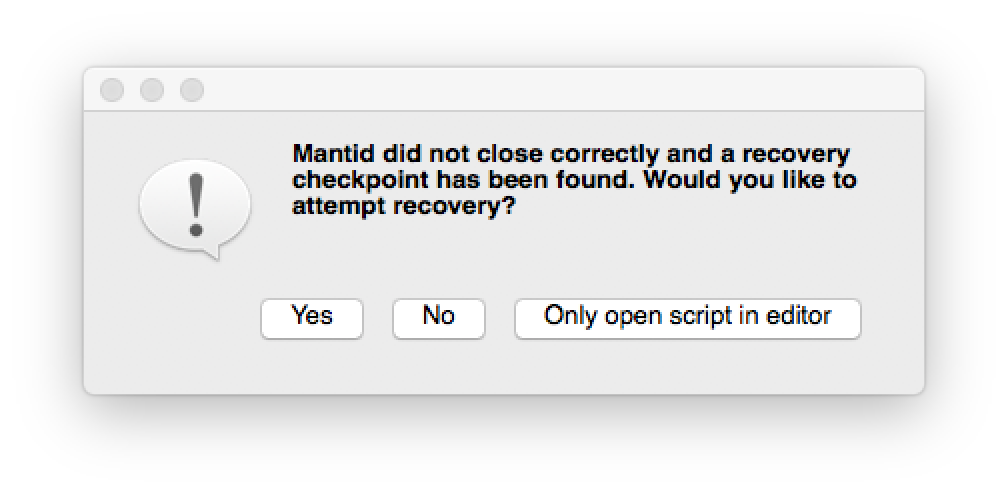
If Mantid has crashed, then on the subsequent reboot you will be presented with the project recovery dialog (see image)
alternate text

You can choose to attempt a full recovery, to open a recovery script or not to attempt a recovery. Full recovery will attempt to recover all workspaces present at the time of the crash as well as additional dialogs like plots or data windows. Script mode will attempt to construct a script that contains the history of all workspaces at the time of the crash.

If full project recovery runs succesfully the scripting window will remain open in MantidPlot. It is safe to close this after a recovery.

NB This is an early version of project recovery. We think that it is a lot better than nothing, but we know it won’t always work. Known caveats are listed below. Moreover, we would sincerely appreciate feedback and input from users. Contact us at mantid-help@mantidproject.org

The settings for project recovery, including switiching the feature on/off, and how to set them, are listed at the bottom of this page.

Caveats

  • Multiple instances of Mantid
    • Please allow first instance to start history writer before starting the next instance, otherwise it will not start for either. This usually means leaving Mantid until the GUI has opened fully.
    • Only the first instance will have history writer enabled. There will be no project recovery for subsequent instances.
    • All running instances of Mantid must be closed for project recovery to work after a crash.
  • Interfaces
    • Muon - project recovery does not work at all with the existing Muon interfaces.
    • Indirect analysis - project recovery does not work when performing fitting routines within the indirect analysis interface.
    • SANS - project recovery does not currently work with the SANS interface.
  • Dictionary properties
    • Affects: SANS interface, SetSample algorithm
    • Cause: Currently the history writer does not serialise Python dictionaries correctly.
  • If full project recovery does not work:
    • If the project recovery process has managed to create a script of the ordered workspace histories, this will appear in MantidPlot, it will have a red arrow beside the line where the process failed. In many cases it is possible to edit the script by hand to get it to run.
    • If project recovery did not manage to generate the ordered history script then it will return to MantidPlot as normal, with an error message.

Settings

  • Project recovery behaviour can be edited by editing the Mantid.user.properties file
    • Windows: $MantidInstallDirectorybinMantid.user.properties
    • OSX: $HOME/.mantid/Mantid.user.properties
    • Linux:$HOME/.mantid/Mantid.user.properties
  • Three settings you can add to this file:
    • On/off: projectRecovery.enabled=true
    • Regularity: projectRecovery.secondsBetween = 60
    • Number of backups to keep: projectRecovery.numberOfCheckpoints = 5

Category: Concepts