

CreateMonteCarloWorkspace v1#
Summary#
Creates a randomly simulated workspace by sampling from the probability distribution of input data.
Properties#
Name |
Direction |
Type |
Default |
Description |
|---|---|---|---|---|
InputWorkspace |
Input |
Mandatory |
Input Workspace containing data to be simulated |
|
Seed |
Input |
number |
32 |
Integer seed that initialises the random-number generator, for reproducibility |
MonteCarloEvents |
Input |
number |
0 |
Number of Monte Carlo events to simulate. Defaults to integral of input workspace if 0. |
OutputWorkspace |
Output |
Mandatory |
Name of output workspace. |
Description#
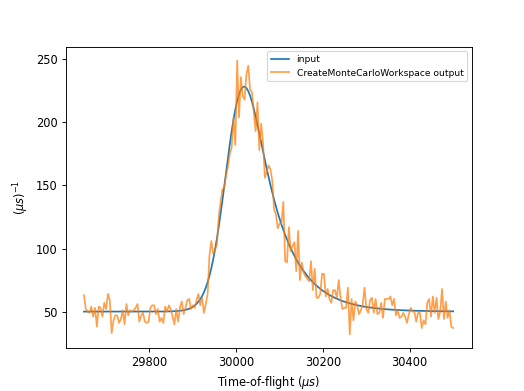
The algorithm generates a simulated workspace by sampling from the probability distribution of input data, useful for testing of fitting functions and modeling.
Usage#
Example - CreateMonteCarloWorkspace
# import mantid algorithms, numpy and matplotlib
from mantid.simpleapi import *
import matplotlib.pyplot as plt
import numpy as np
from mantid.api import FunctionFactory

func = FunctionWrapper(FunctionFactory.createInitialized("name=BackToBackExponential,I=25000,A=0.06,B=0.015,X0=30000,S=30;name=FlatBackground,A0=50"))
# create input workspace
x = np.linspace(29650.0, 30500.0, 201)
y = func(x)
e = np.sqrt(y)
ws = CreateWorkspace(DataX=x, DataY=y, DataE=e, UnitX="TOF")
# call algorithm
ws_mc = CreateMonteCarloWorkspace(InputWorkspace=ws, Seed=0)

fig, axes = plt.subplots(subplot_kw={'projection': 'mantid'})
axes.plot(ws, label='input', wkspIndex=0)
axes.plot(ws_mc, label='CreateMonteCarloWorkspace output', wkspIndex=0, alpha=0.75)
legend = axes.legend(fontsize=8.0).set_draggable(True).legend
fig.show()
Categories: AlgorithmIndex | Simulation
Source#
C++ header: CreateMonteCarloWorkspace.h
C++ source: CreateMonteCarloWorkspace.cpp