

IndirectResolution v1#
Summary#
Creates a resolution workspace for an indirect inelastic instrument.
Properties#
Name |
Direction |
Type |
Default |
Description |
|---|---|---|---|---|
InputFiles |
Input |
str list |
Comma seperated list if input files |
|
Instrument |
Input |
string |
Mandatory |
Instrument used during run. Allowed values: [‘IRIS’, ‘OSIRIS’, ‘TOSCA’] |
Analyser |
Input |
string |
Mandatory |
Analyser used during run. Allowed values: [‘graphite’, ‘silicon’, ‘mica’, ‘fmica’] |
Reflection |
Input |
string |
Mandatory |
Reflection used during run. Allowed values: [‘002’, ‘004’, ‘006’, ‘111’, ‘333’] |
DetectorRange |
Input |
int list |
0,1 |
Range of detectors to use in resolution calculation. |
BackgroundRange |
Input |
dbl list |
0,0 |
Energy range to use as background. |
RebinParam |
Input |
string |
Rebinning parameters (min,width,max) |
|
ScaleFactor |
Input |
number |
1 |
Factor to scale resolution curve by |
LoadLogFiles |
Input |
boolean |
True |
Option to load log files |
CalibrationWorkspace |
Input |
Optional calibration workspace; spectra absent from it (by detector ID) are excluded from the resolution sum. |
||
OutputWorkspace |
Output |
Mandatory |
Output resolution workspace. |
Description#
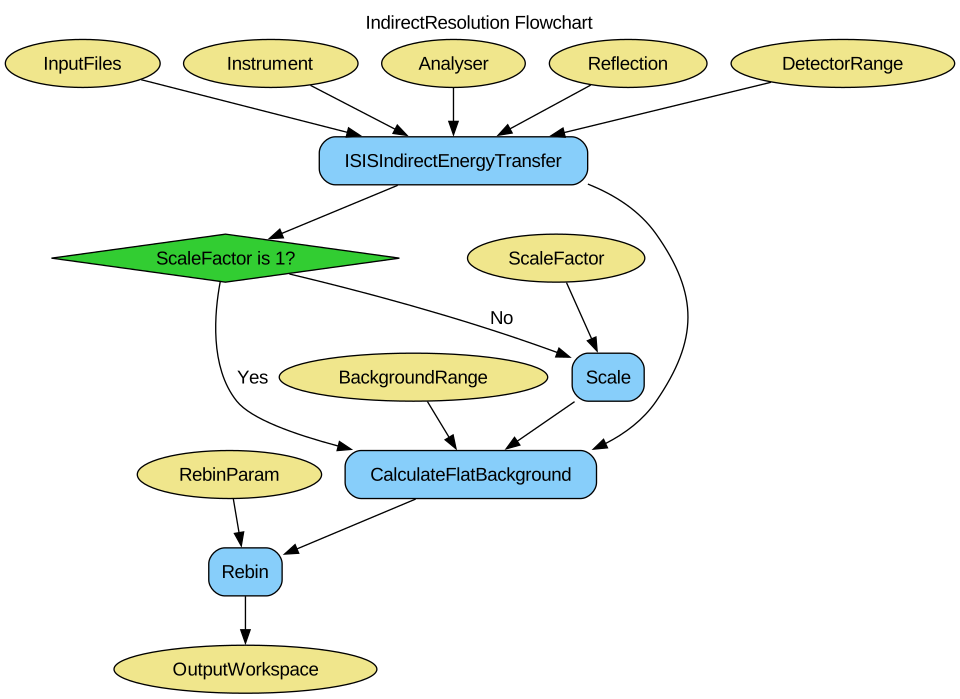
Creates a resolution workspace for an inelastic indirect sample run by summing all spectra in the energy transfer and subtracting a flat background to give a single resolution curve.
Rebinning and intensity scaling can optionally be applied to the result.
An optional calibration workspace can be supplied to exclude detector pixels that were excluded while creating the calibration, for example unreliable OSIRIS silicon edge pixels or pixels with low calibration factors. The remaining spectra are averaged to create the resolution curve.
Workflow#
Usage#
Note
To run these usage examples please first download the usage data, and add these to your path. In Mantid this is done using Manage User Directories.
Example - Running IndirectResolution.
resolution = IndirectResolution(InputFiles='IRS26173.raw',
                                Instrument='IRIS',
                                Analyser='graphite',
                                Reflection='002',
                                DetectorRange=[3, 53],
                                BackgroundRange=[-0.16, -0.14],
                                RebinParam='-0.175,0.002,0.175')

print('Number of histograms: {:d}'.format(resolution.getNumberHistograms()))
print('Number of bins: {:d}'.format(resolution.blocksize()))
Output:
Number of histograms: 1
Number of bins: 175
Categories: AlgorithmIndex | Workflow\Inelastic | Inelastic\Indirect
Source#
Python: IndirectResolution.py